Latest Feature
Common Opponent Positions
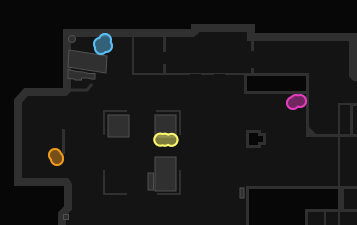
After the veto stage, Mappio automatically downloads your opponents' recent matches and displays their preferred positions on a map directly in the matchroom.
 Browse other Mappio features
 Install extension
How To Use Mappio
Step 1. Install Mappio browser extension
 Install
 Install
'%3e%3cpath%20fill-rule='evenodd'%20clip-rule='evenodd'%20d='M63.9999%2032.0024C63.9999%2041.4774%2059.8766%2050.0014%2053.3238%2055.8539C45.1115%2059.8543%2037.459%2057.0551%2034.935%2055.307C42.9985%2053.5425%2049.0824%2043.7935%2049.0824%2032.0071C49.0824%2020.2196%2042.9949%2010.4706%2034.935%208.69418C37.4697%206.94148%2045.1221%204.14818%2053.3226%208.14268C49.5726%205.65998%2045.1942%204.22608%2040.5122%204.22608C32.8869%204.22608%2026.0648%208.00328%2021.4608%2013.9632L21.4632%2013.9656C17.9269%2018.142%2015.6402%2024.3145%2015.4867%2031.2548V32.7642C15.6403%2039.6892%2017.9399%2045.8652%2021.4762%2050.0404C26.0648%2056.0051%2032.887%2059.7776%2040.5122%2059.7776C45.2001%2059.7776%2049.588%2058.3531%2053.3369%2055.8646C47.6616%2060.9292%2040.1887%2064.0012%2032.0012%2064.0012C31.4885%2064.0012%2030.9783%2063.9894%2030.4775%2063.9658C13.5131%2063.165%200%2049.164%200%2032.0012C0%2014.3246%2014.3246%20-0.0012207%2032.0012%20-0.0012207H32.124C40.2726%200.0235793%2047.7006%203.10038%2053.337%208.15078L53.3251%208.14378C59.8721%2014.008%2064.0001%2022.531%2064.0001%2032.0071V32.0024H63.9999Z'%20fill='white'/%3e%3c/g%3e%3cdefs%3e%3cclipPath%20id='clip0_429_23'%3e%3crect%20width='64'%20height='64'%20fill='white'/%3e%3c/clipPath%3e%3c/defs%3e%3c/svg%3e) Install
Install Install
Step 2. Start a FACEIT Match
Step 3. Analyze each player's and team's map statistics
Mappio displays each player's and each team's average map statistics directly in the match room interface. Use the provided statistics to uncover your opponent's weakest maps.
Player card

Team average card

Step 4. Analyze the opposing captain's map drop probabilities
Mappio calculates the opposing team's captain map drop probabilities and displays them directly in the match room. If you see that the opponent drops Anubis very often, you might want to let him drop it and use your veto pick to drop some other map you do not want to play.

Step 5. Analyze the opposing team's favorite positions
After the veto stage, Mappio automatically downloads your opponents' recent matches and displays their preferred positions on a map directly in the matchroom. Use this information to expect opponents in specific positions during your match.
Step 6. Dominate your opponents and grab easy elo!
With Mappio's insights, you'll outsmart your opponents with ease, securing your path to victory and claiming the elo you deserve!